How to Choose the Right Media Converters for Your Network

Choosing media converters is not just a matter of matching a copper port to a fiber port. The right device must fit the network’s speed, distance, fiber type, and installation environment. A mismatch can leave a link dark, unstable, or slower than expected. Small details matter.

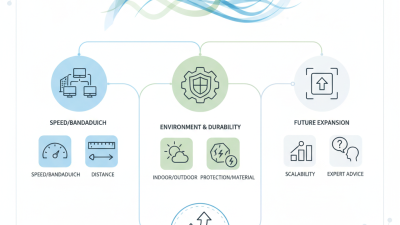
Network infrastructure specialist Daniel Mercer puts the selection rule this way: “A converter is only a good fit when both ends agree on speed, fiber type, and optics.” Use that as a practical check, not a substitute for product specifications. Confirm whether the link uses single-mode or multimode fiber, the required wavelength, connector type, and target distance. Then check Ethernet speed, duplex settings, and whether the converter supports the needed features, such as link-fault pass-through or Power over Ethernet. One detail is easy to miss: a compatible-looking connector does not guarantee compatible optics.

The installation itself should guide the choice. A quiet office cabinet may suit an unmanaged unit, while a remote site can benefit from managed monitoring and alarms. Check operating temperature, power supply options, mounting space, and the equipment already installed at both ends. There is no perfect pick. A careful review of the datasheet—and a test with the actual cable and devices—can prevent avoidable surprises. This guide explains how to compare media converters by their key specifications, deployment needs, and long-term support. It also highlights where assumptions can fail, because network plans are rarely as tidy as diagrams.

How to Choose the Right Media Converters for Your Network

Understanding Media Converters and Their Role in a Network

A media converter connects network segments that use different physical media, usually copper Ethernet and optical fiber. It turns electrical signals into light, then converts incoming light back into electrical signals. That is the bridge. It does not route traffic or increase bandwidth by itself. In an office, a switch might connect by copper to a converter, then send data over fiber to another building. Fiber supports longer runs and resists electromagnetic interference. Copper remains practical for short device connections. The converter lets these segments operate as one link, if speed, duplex mode, wavelength, connector, and fiber type are compatible.

The demand for dependable network links is easy to underestimate. The International Telecommunication Union’s Facts and Figures 2023 reported that 5.4 billion people were online, about 67% of the world’s population. That figure does not measure traffic at any single site, but it shows the scale of connected use. A practical choice starts with the actual link distance and the equipment’s optical specifications. Check whether the fiber is single-mode or multimode, and confirm the required transmission speed at both ends. A specification sheet can still mislead when modules use different wavelengths. Test the complete link before deployment, especially across existing cabling with unknown connectors or patch-panel changes.
How to Choose the Right Media Converter for Your Network

Representative maximum link distances for common Ethernet physical-layer standards

Choose a converter that matches the Ethernet speed, fiber type, and optical standard at both ends. Distances shown are standard-specific reference limits: actual reach depends on the fiber grade and link conditions. For example, 1000BASE-SX reaches up to 550 m on specified multimode fiber, while 10GBASE-LR supports up to 10 km over single-mode fiber.

Identifying Network Requirements and Operating Conditions

Choosing a media converter starts with the network’s actual requirements, not the longest distance listed on a product sheet. Record each port’s speed, whether links need single-mode or multimode fiber, and the connector type already installed. Check the required reach and available optical power budget; distance alone does not guarantee a stable link. Confirm duplex settings and supported Ethernet standards, too. A mismatch can leave a link light on while traffic still drops.

Operating conditions matter just as much. A converter in a ventilated office faces different demands from one inside a dusty cabinet near a factory floor. Check the rated temperature range, humidity limits, power input, and mounting options. Measure the cabinet’s temperature during its busiest hours, not only when the room feels cool. Allow space for airflow and cable bends. Specifications can look reassuring on paper; real cabinets are often more crowded than planned.

Tips: Label both ends of each fiber run, then test the link before deployment. Keep spare power supplies where downtime would be costly. If the network has unusual traffic or harsh conditions, verify compatibility with a small pilot first. That extra check may reveal a detail the planning sheet missed.

Matching Converter Types to Fiber, Ethernet, and Protocol Needs

Choosing a media converter starts with the link at each end, not just the distance. For fiber, confirm single-mode or multimode cable, supported wavelength, connector type, and required reach. A short multimode run between two equipment rooms may suit a different converter than a long single-mode connection across a campus. Check the cable label and module specifications; assumptions here can leave the link dark.

Ethernet speed and duplex settings must also match. A converter rated for one gigabit may not support a ten-gigabit link, even if the connectors fit. Confirm auto-negotiation behavior at both ends, and verify whether the device supports the Ethernet standard in use. Small details matter. In real installations, mismatched settings can look like a damaged cable, so test with known-good patch leads before replacing hardware.

Protocol needs call for extra care. A basic media converter changes the physical medium, such as copper Ethernet to fiber; it does not necessarily translate one data protocol into another. If a network includes serial equipment or a specialized industrial protocol, check whether a protocol gateway is required instead. Also consider power, operating temperature, and link-status indicators. A clear diagnostic light helps, though it cannot explain every intermittent fault. Record the selected media, speed, wavelength, and distance so future replacements are less guesswork.

How to Choose the Right Media Converters for Your Network - Matching Converter Types to Fiber, Ethernet, and Protocol Needs

Converter Type Typical Interfaces Fiber or Cable Match Typical Speed and Reach Protocol Compatibility Best Fit Key Checks
Ethernet copper-to-fiber converter RJ45 10/100/1000BASE-T to an optical Ethernet port Choose multimode or single-mode fiber to match the installed cabling and optical transceiver. Commonly 1 Gb/s; reach depends on the optical standard, fiber type, and transceiver, ranging from hundreds of meters to 10 km or more. Bridges Ethernet physical media; it does not translate Ethernet into a different network protocol. Extending an Ethernet link beyond copper distance limits or connecting copper equipment to a fiber backbone. Match speed, duplex, wavelength, connector, fiber mode, and optical reach at both ends. Standard twisted-pair Ethernet channels are limited to 100 m.
Multimode fiber converter Ethernet copper or fiber interface to a multimode optical port Multimode fiber, commonly OM1 through OM5; optical wavelength and transceiver type must be compatible. For example, 1000BASE-SX can reach up to 550 m on suitable OM2–OM4 fiber; 10GBASE-SR reaches up to 300 m on OM3 or 400 m on OM4. Supports the Ethernet standard specified by the converter and its optics; it does not convert between unrelated protocols. Short- to medium-distance links within buildings, equipment rooms, or data centers where multimode fiber is already installed. Verify the exact fiber grade and standard. Older fiber or lower-grade cabling can reduce the supported distance.
Single-mode fiber converter Ethernet copper or fiber interface to a single-mode optical port Single-mode fiber, typically OS1 or OS2, with optics matched for wavelength and connector type. Common 1 Gb/s optics include 1000BASE-LX, typically specified up to 10 km over single-mode fiber. Longer reaches require optics rated for the intended distance. Carries supported Ethernet traffic over single-mode fiber without changing higher-layer protocols. Campus, building-to-building, or service-provider links that need greater reach than multimode fiber commonly provides. Confirm the optical budget, transmit/receive wavelengths, connector polish, and whether attenuation or dispersion limits apply.
Single-fiber, bidirectional (BiDi) converter Ethernet interface with a single-strand optical connection Single-mode fiber using paired optics that transmit and receive on different wavelengths over the same strand. Reach and speed depend on the specific optic rating; common Ethernet versions are available at 1 Gb/s and 10 Gb/s. Supports the Ethernet rate and standard specified for the paired optics; it is not a general-purpose protocol converter. Sites where only one fiber strand is available or where preserving spare strands is important. Use complementary wavelength pairs at opposite ends. Both devices must support the same speed and compatible optical specifications.
PoE Ethernet-to-fiber converter PoE copper port plus an optical Ethernet port Fiber type and reach depend on the optical interface; the copper port supplies power to a connected endpoint. Data rate and optical reach depend on the Ethernet and optics specifications. PoE output is limited by the device’s supported IEEE class and power budget. Extends Ethernet connectivity to PoE devices; it does not convert the application protocol. Connecting remote IP cameras, wireless access points, or other PoE endpoints where fiber is used for the uplink. Check IEEE 802.3af, 802.3at, or 802.3bt support as required, available power, input supply, and environmental rating.
Managed or industrial Ethernet converter One or more copper and fiber Ethernet ports; industrial models may support DIN-rail mounting Multimode or single-mode fiber according to the selected optical ports or transceivers. Commonly 10/100/1000 Mb/s; distance is determined by the installed optics and fiber specification. Can support Ethernet features such as VLANs, link alarms, or redundant-link protocols when explicitly listed; it does not inherently translate non-Ethernet protocols. Industrial, utility, or managed networks that need diagnostics, configuration, redundancy, or wider operating-temperature support. Check management functions, redundancy compatibility, operating temperature, power input, mounting, and the required Ethernet standards.
Serial-to-fiber converter RS-232, RS-422, or RS-485 serial interface to an optical interface Fiber type and connector depend on the unit; some models use single-mode or multimode fiber. Serial data rate and optical reach vary by model and fiber specification; use the manufacturer’s rated limits for both. Extends a serial interface over fiber; it is distinct from an Ethernet media converter and does not automatically turn serial data into Ethernet. Connecting serial equipment across electrically noisy areas or between locations where electrical isolation is useful. Match the serial standard, wiring, two-wire or four-wire mode, baud rate, and required point-to-point or multidrop topology.

Selection note: Typical distances are examples tied to specific Ethernet standards and fiber grades, not universal guarantees. Confirm the converter’s supported standards, optical module specifications, link budget, and the characteristics of the installed cable before deployment.

Checking Compatibility, Performance, and Power Specifications

A media converter must match both ends of the link. Check whether the network uses single-mode or multimode fiber, then confirm connector type and optical wavelength. A connector that fits may still be wrong for the cable. Small mismatches matter. Verify the supported data rate and duplex mode too; a speed mismatch can cause a link to negotiate poorly or fail to connect. For long runs, compare the converter’s rated distance with the actual route, including patch cables and connection points.

Performance is more than headline speed. Consider expected traffic, packet size, and whether the converter supports the Ethernet standard used by your switches. A busy office uplink may need different capacity from a camera feeding a nearby cabinet. Check latency and forwarding behavior if timing is important. Datasheets can be dense, and I sometimes have to read the fine print twice. Pay close attention to operating temperature and airflow, especially inside a crowded enclosure.

Power specifications deserve the same care. Confirm the required input voltage, connector polarity, and power supply capacity before installation. If the unit supports Power over Ethernet, check the supported standard and available power budget; the switch must provide enough power for the converter and connected equipment. Leave a margin rather than sizing everything to the exact limit. A spare supply can help during troubleshooting, but it will not fix incorrect voltage or polarity. Write down the chosen fiber type, wavelength, and power source beside the equipment; that small record can save guesswork later.

Planning Installation, Testing, and Future Network Expansion

Before selecting media converters, map every link from switch port to endpoint. Record copper speed, fiber type, connector, wavelength, distance, and available rack power. Check the optical link budget against the cable route, including patch panels and spare slack. Small details matter. A converter that matches the fiber but not the wavelength can leave a dark link.

During installation, label both cable ends and keep transmit and receive paths clear. Test the complete link, not just the converter’s status lights. Measure optical power where possible, then verify throughput, duplex settings, and error counters under load. Test before handover. A tidy cabinet can still hide crossed fibers or a poor connector. Even a careful plan can miss polarity, so check it twice.

For expansion, leave rack space, power capacity, and spare fiber pairs where practical. The Ethernet Alliance’s 2024 Ethernet Roadmap includes 800GbE and 1.6TbE generations, illustrating how interface speeds continue to advance. That is not a reason to buy faster optics prematurely. Choose converters that meet today’s link requirements, while documenting which future upgrades would require new fiber, optics, or switches. Keep records current.